
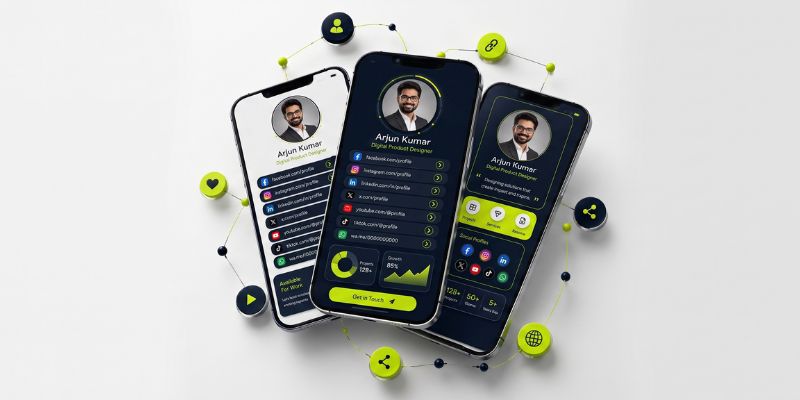
Your LinkedIn profile is in one place, Instagram in another, your portfolio has its own URL, and clients may need a separate WhatsApp, booking, or website link. Sharing everything individually quickly becomes difficult to manage.
Keeping all links in one place gives people one clear destination where they can find the information you actually want them to see.
There is an important distinction, though. Some tools are designed to privately save bookmarks for later, while others create a public, shareable profile containing multiple links. This guide focuses on the second use case: building one organized page for your professional links, social profiles, portfolio, contact details, and other important destinations.
Why Put All Your Links in One Place?
A single profile is easier to share than repeatedly sending several separate URLs.
For a freelancer, that profile might include a portfolio, LinkedIn account, booking page, and contact information. A creator may want to share YouTube, Instagram, TikTok, and recent content. A consultant or small business may need services, case studies, contact details, and social profiles in one destination.
The key benefit is not simply having more links. It is organizing those links around what the visitor needs to do next.
Instead of making someone search through several profiles, you can provide one page and guide them toward your most important content.
Step 1: Decide Which Links Actually Matter
Start by listing the digital destinations you currently share with clients, followers, employers, or business contacts.
Typical examples include:
- LinkedIn, Instagram, TikTok, YouTube, or other active social profiles
- Your portfolio, projects, case studies, or CV
- Website or online store
- Email, WhatsApp, or another contact option
- Booking or consultation page
- Latest article, video, product, or campaign
Do not add a link simply because it exists.
Ask a more useful question:
What should someone visiting my profile be able to do?
If your main goal is generating enquiries, your contact or booking option should be easy to find. If you are a designer looking for work, your strongest portfolio should receive more attention than a rarely used social account.
Step 2: Use One Professional Digital Profile for Your Links
Once you know what needs to be shared, you need one destination to organize it.
A basic list of URLs can technically do this, but professionals often need more context. A visitor should be able to understand who you are, what each link contains, and which action matters most.
Profileon works as a professional digital profile builder where you can bring together your important links, contact details, social profiles, portfolio, and professional information within one customizable profile.
This approach also gives the page a purpose beyond being a directory of URLs. It becomes part of your professional online identity.
Step 3: Organize Links Around the Visitor
Putting twenty unrelated buttons on one page does not automatically make the page useful.
Group links logically so visitors can scan the profile without guessing where to click.
| Section | What You Might Include |
| Start Here | Main website, best project, primary CTA |
| Work & Portfolio | Portfolio, projects, case studies, CV |
| Connect | Email, WhatsApp, booking link |
| Social Profiles | LinkedIn, Instagram, TikTok, YouTube |
| Latest | Recent article, video, campaign, product |
Use descriptive link labels.
For example:
Better: View My Design Portfolio
Less useful: Portfolio
Better: Book a Consultation
Less useful: Calendar
The visitor should understand what will happen before clicking.
You can also explore different professional and creator scenarios on the Profileon use cases page.
Step 4: Make the Profile Easy to Scan
Design should support the links rather than compete with them.
Start by making the most important action easy to notice. Then keep the rest of the page visually consistent.
A few practical principles help:
Prioritize important links.
Do not give every destination equal visual weight.
Use short, descriptive titles.
Visitors usually scan before they read closely.
Remove outdated destinations.
A profile should represent what is relevant now.
Avoid duplicate links.
Repeated destinations add clutter without helping the visitor.
Keep branding consistent.
Fonts, colors, profile images, and wording should feel like they belong to the same person or business.
A professional profile should answer three questions quickly:
Who is this?
What do they do?
Where should I click next?
Step 5: Share One Link and Keep the Content Updated
Once your profile is ready, you can use the same profile URL across the places where people discover you.
That may include your:
- Social media bios
- Email signature
- CV or resume
- Presentation slides
- Business communication
- Online portfolio
- QR-based profile sharing
The advantage is that the profile becomes the destination.
When a portfolio changes or you want to feature a new project, you update the content inside your profile rather than rewriting a long group of URLs every time you introduce yourself.
For more practical content on managing a professional online presence, browse the latest digital profile guides.
Link Hub vs Bookmark Manager vs URL Shortener
These tools may sound similar, but they solve different problems.
| Tool | Main Purpose | Best Used For |
| Professional profile / link hub | Share several public destinations through one page | Social links, portfolio, contact details, professional identity |
| Bookmark manager | Privately save links you want to revisit | Research, reading lists, saved resources |
| URL shortener | Create a shorter URL for one destination | Campaign links, cleaner URLs, tracking |
This difference matters for searchers looking for a way to keep all links in one place.
If you are trying to save research privately, a bookmark manager is the better category.
If you want clients, followers, or professional contacts to access several important destinations through one shareable profile, a link hub or digital profile is the more appropriate solution.
What Should You Put on a Professional Link Profile?
Include information that helps the visitor understand who you are or take a useful next step.
A freelancer might prioritize:
Portfolio → Services → Contact → LinkedIn
A creator could prioritize:
Latest Content → YouTube → Instagram → Other Channels
A consultant might use:
Services → Case Studies → Book a Call → Professional Profiles
A job seeker could use:
CV → Portfolio → LinkedIn → Contact Information
The right structure depends on why people visit your profile.
What Should You Leave Out?
More links do not automatically make a stronger profile.
Consider removing:
Outdated pages
Old projects or offers that no longer represent you.
Private or internal URLs
Anything not intended for public visitors.
Duplicate destinations
The same link appearing repeatedly in different sections.
Low-value social profiles
Accounts that are inactive or irrelevant to your professional goal.
Links without context
If visitors cannot understand why they should click, rewrite the label or reconsider whether the link belongs there.
A smaller, intentional set of links is usually easier to navigate than an unstructured archive.
Common Mistakes When Organizing Multiple Links
Treating the Page Like a Bookmark Folder
Your visitor does not need your entire internet history. They need the destinations relevant to why they found you.
Giving Every Link the Same Priority
One or two actions should usually matter more than the rest. Structure the profile accordingly.
Using Vague Button Text
“Click Here” provides very little context.
Labels such as View My Portfolio, Read the Latest Article, or Contact Me are clearer.
Forgetting to Review Old Links
A polished profile can still create a poor experience if important destinations lead to outdated pages.
Review the profile whenever your main website, portfolio, contact details, or active campaigns change.
Frequently Asked Questions
What does “all links in one place” mean?
It usually means creating a single page that contains several important URLs, such as social profiles, a website, portfolio, contact details, and other resources. Instead of sharing every destination separately, you share the page containing them.
Can I put multiple links into one link?
Yes. Rather than literally merging URLs, you create one page or digital profile that contains the different destinations. You then share the URL of that profile.
Is a link hub the same as a URL shortener?
No. A URL shortener normally redirects one short URL to one destination. A link hub or digital profile opens a page where visitors can choose between multiple destinations.
Can I put all my social media links in one place?
Yes. A profile page can bring LinkedIn, Instagram, TikTok, YouTube, and other social accounts together alongside your website, portfolio, or contact information.
Do I need my own website to create a professional digital profile?
Not necessarily. A digital profile can act as a standalone place to organize your professional information and links. If you already have a website, the profile can also direct visitors to it.
How often should I update my links?
Update them whenever an important destination changes. It is also worth reviewing the profile periodically to remove outdated content and make sure your highest-priority links still appear prominently.
For questions about Profileon setup and account features, check the Profileon FAQs.
One Profile Should Make the Next Step Obvious
Keeping all links in one place is most useful when it reduces friction for the person opening your profile.
The goal is not to collect as many URLs as possible. It is to create one organized professional destination where someone can quickly understand who you are, see your best work, find your active channels, and choose the right next step.
Profileon can be used to bring those pieces together in a professional digital profile while keeping the structure easy to update as your online presence changes.